Map Your Voice
Capture how you explain, teach, guide, and communicate.
Create your first AI twin by turning your voice, knowledge, style, and ideas into content, digital products, guides, prompts, templates, and simple offers.
Create Your Digital ProductCapture how you explain, teach, guide, and communicate.
Decide what your AI twin or avatar should help people understand, create, or do.
Use your AI twin to create content, resources, products, and simple offers.
Turn your knowledge into a paid digital product with a practical step-by-step system for choosing the idea, organizing the content, designing it, and preparing it to sell.
Get Create & Cash In for $37Draft blog posts, captions, and educational emails that sound like you.
Create guides, templates, and courses using your unique knowledge.
Create paid guides, templates, prompt packs, and resources built around one clear problem your audience wants solved.
Answer frequent questions and guide new students through your methods.
Turn complex ideas into simple frameworks people can actually use.
Establish easy workflows for showing up and sharing your expertise consistently.
AI Creators Academy is optional support for people who want mentorship, community, feedback, and personalized help while building their AI twin and related digital products.
Get guidance as you shape your AI twin’s voice, purpose, personality, and content direction.
Ask questions, share progress, and connect with others building AI twins and digital products.
Get help applying the tools to your own brand, ideas, products, and offers.


Updated: 6 days ago
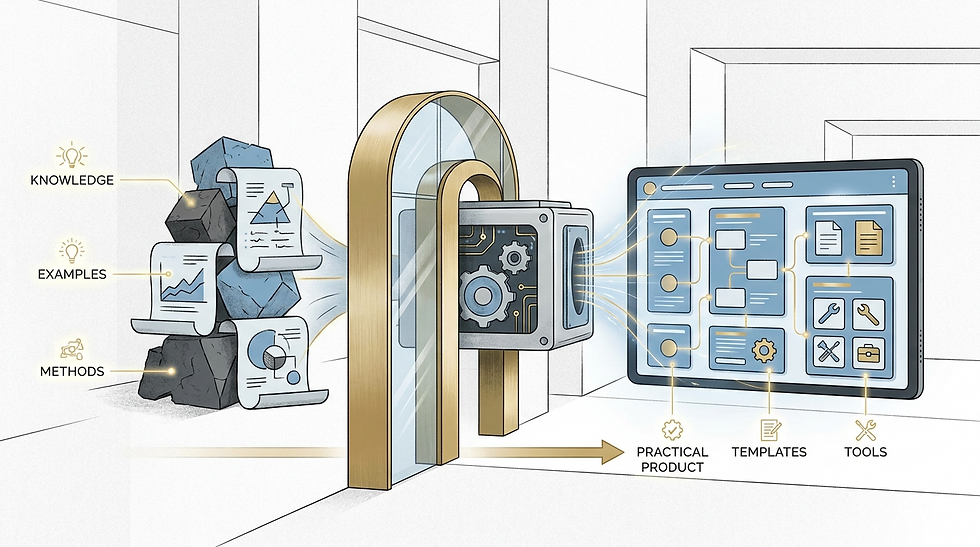
This guide explains how to package a process into a digital product that is clear, useful, and easy for your audience to apply. You’ve refined a repeatable workflow—whether for client onboarding, content strategy, or project execution—and now need to transform it into a scalable digital asset without sacrificing strategic nuance or operational efficiency. This guide provides actionable steps for professionals to convert proven processes into clear, high-value digital guides, template collections, workbooks, or toolkits that maintain the integrity of your expertise while delivering tangible benefits to your audience.

When a workflow becomes repeatable—such as a sales sequence, design sprint, or client delivery pipeline—it creates a competitive advantage. However, without intentional packaging, this advantage remains invisible to clients, colleagues, or future stakeholders. Effective packaging transforms your process into a structured, shareable asset that preserves strategic intent, reduces cognitive load, and enables consistent execution without oversimplification.
For professionals, this means faster onboarding, reduced friction, and the ability to scale while maintaining quality. The critical distinction lies in aligning the packaging with your audience’s needs, the complexity of the process, and your long-term business objectives.
Begin by defining the core value and target audience. Ask what specific problem the process solves and who needs the solution. For example, a marketing manager might need a campaign optimization template, while a consultant could create a workbook that helps clients assess project readiness.
Clarify the audience’s pain points and the unique value your process delivers. Next, extract the repeatable steps. Focus on critical decisions, checks, and adjustments rather than granular details.
A project manager might create a scope validation checklist with questions such as: What is the budget buffer? How will risks be reduced? This keeps the packaged process focused on judgment and outcomes instead of becoming a long task list.
Next, structure the material for clarity and context. Choose a format that fits the audience’s workflow. A digital guide might use short modules with clear headings, while a template collection could include fillable forms, decision trees, or conditional logic.
Add practical validation mechanisms so the process remains useful over time. For example, a client onboarding template might include a review checkpoint asking whether the step addressed the client’s main concern before moving forward.
This prevents oversimplification and helps the process stay relevant. Finally, test and improve the packaged version before sharing it widely.
Share the draft with a small group of your target audience. Ask whether it helps them reach the intended result without adding unnecessary effort. If they report friction, remove unnecessary steps, add missing context, or adjust the format.
This iterative approach ensures the final product is practical and audience-focused.
Here are three concrete examples of professionals successfully packaging repeatable processes: Marketing Manager: Created a digital guide for campaign optimization that includes a template for segmenting customer data, a checklist for A/B testing, and a decision tree for channel selection based on budget and engagement metrics.
A marketing guide can explain why certain audience segments are prioritized, helping professionals avoid broad assumptions. A consultant might create a workbook with prompts about past project risks and how success will be measured.
This helps clients understand and apply the process without needing constant oversight. A project manager could also build a template collection with dynamic checklists and conditional steps.
For example, a smaller project may use a simplified risk review, while a larger project follows the full process. This makes the workflow easier to follow while preserving the checks needed for consistent decisions.
Before finalizing your digital product, apply this checklist to ensure it meets professional standards: Does the product solve a specific, recurring problem for your target audience? Are the steps clear enough that users can complete them without additional guidance? Does it include context—why each step matters and how it connects to broader goals?
Are there validation mechanisms to ensure the process remains effective over time? Have you tested it with a small group of users to confirm it reduces friction, not adds complexity?
This framework avoids common pitfalls like oversimplification or over-engineering by anchoring packaging in real-world use cases. Professionals who follow this approach see immediate benefits: faster onboarding, reduced friction, and the ability to scale without sacrificing quality. The result is a digital asset that’s both strategic and actionable—something that stands up to real-world challenges and continues to deliver value over time.
Choose the right product format by matching it to your audience’s needs and your process. A digital guide excels for step-by-step processes requiring explanation—ideal for beginners learning complex tasks, like a "Starting a Small Business" guide with clear sections. Templates work best when users need repeatable structures, such as a social media content calendar template for consistent posting.
Workbooks are essential when hands-on practice is crucial, like a financial planning workbook with exercises to build skills. Checklists suit quick, actionable steps—perfect for a project kickoff checklist ensuring all essentials are covered. Toolkits bundle related resources for complex workflows, such as a sales funnel toolkit combining templates, checklists, and guides.
Key decision criteria: Consider process complexity (simple vs. intricate), how much explanation is needed (minimal for templates, detailed for guides), whether exercises are required (yes for workbooks), and if multiple resources belong together (toolkits for integrated systems). Avoid overcomplicating simple tasks—e.
g. , a checklist for a single action, not a full guide. Also, never choose a format before understanding how your audience will use it.
If your users just need to apply a template quickly, a workbook is overkill. Common mistakes include building a detailed guide for a one-step task or assuming your audience wants exercises when they only need a checklist. Always start with the user’s actual workflow to pick the simplest, most effective format.
Give the packaged process to one or two people who match the target audience and ask them to complete it without live guidance. Observe where they hesitate, note any instructions they have to guess, and revise only the unclear parts so the resource stays focused.
1. How can I preserve the nuance of my process when packaging it digitally? Include decision points, short explanations, realistic examples, and notes about when the process should be adapted. Nuance comes from showing how judgment is applied—not from adding every detail you know.
2. How do I know if my packaged process is too simplistic? It's probably when the guide lacks depth - like not covering edge cases, variations, or real-world complexities. For example, if it's too rigid and doesn't account for unexpected situations, that's a sign it's oversimplified.
3. Should pricing or revenue models be included in the product itself? Include pricing or revenue guidance only when it is essential to completing the promised outcome. Otherwise, keep it in a separate resource so financial assumptions do not distract from the process the product is designed to teach.
4. What is the difference between a digital guide and a template collection?
A digital guide explains what to do, why it matters, and how the steps connect. A template collection provides reusable structures the reader fills in or adapts. Guides teach the process; templates help someone perform it repeatedly.
5. How long should I expect process packaging to take?
Process packaging duration varies based on your process complexity and team experience. Simple workflows might take weeks, while intricate systems could require months. Expect realistic timelines through thorough analysis and iterative refinement.
Packaging a repeatable process into a digital guide, template, or toolkit is about more than documentation—it’s about creating a strategic asset that preserves the value of your expertise while making it accessible to others. By focusing on clarity, context, and practical validation, you can turn a proven workflow into a scalable resource that drives real results without oversimplification. The key is to start with the problem your audience faces, not the process itself.
Ready to organize your expertise into a practical digital product? Explore Create & Cash In.
Ready to turn this into a real digital product? Create & Cash In gives you a focused path from idea to finished offer.


Comments